
The best SEO plugin for WooCommerce in 2026 is usually two plugins, not one: a technical plugin such as Rank Math or Yoast SEO for sitemaps, schema and redirects, plus a content plugin such as RankX SEO that actually writes the product descriptions, meta tags and image ALT text those plugins only score. If you can install just one free plugin, Rank Math gives a WooCommerce store the most out of the box.
That’s the short answer. The longer one matters, because most “best SEO plugin” lists were written for blogs, and a store with 400 products has a very different problem from a blog with 40 posts.
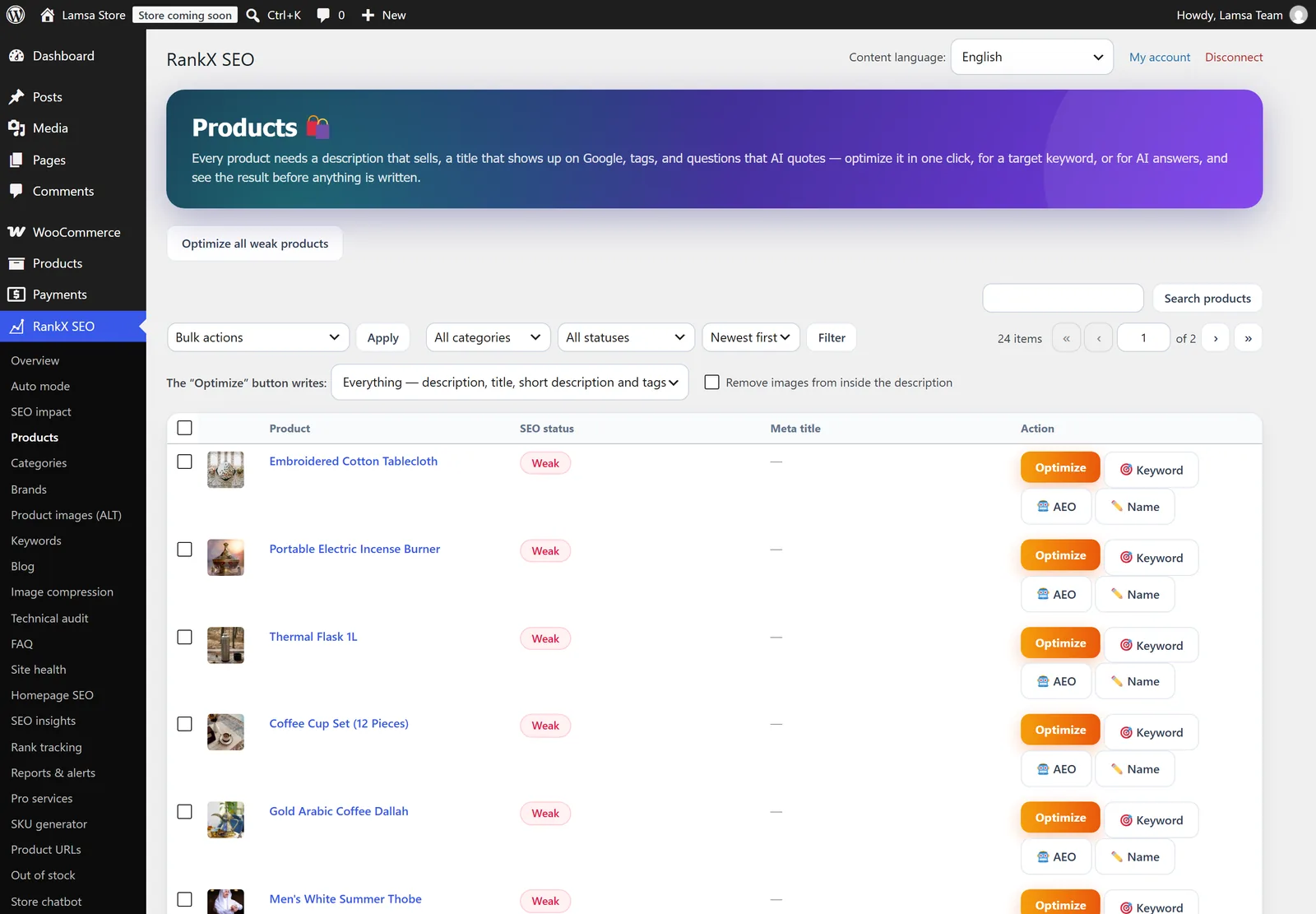
A real WooCommerce products table with RankX SEO: weak products stand out, optimized ones carry a dated stamp.
Quick verdict: which plugin fits which store?
There is no single winner for every store, so here is the honest map we’d give a friend. Pick the row that sounds like you and you can skip half of this article.
| Your situation | Best pick | Why |
|---|---|---|
| New store, zero budget | Rank Math (free) | Product schema, redirects, 404 log and Search Console data without paying |
| Beginner who wants guidance | Yoast SEO | The clearest traffic-light checks and the biggest support community |
| Agency running many client stores | AIOSEO or SEOPress | Multi-site licences, white label (SEOPress), clean setup wizards |
| Speed-obsessed, hates settings | The SEO Framework | Light, automatic, almost nothing to configure |
| Hundreds of products with thin or copied descriptions | Rank Math or Yoast + RankX SEO | The technical plugin handles the plumbing, RankX writes the content in bulk |
| Arabic or bilingual store | Rank Math or Yoast + RankX SEO | RankX writes in the site language (Arabic or English) and was built for Gulf stores first |
Keep that last two rows in mind. They are the part almost every other comparison skips.
What a WooCommerce SEO plugin actually needs to do
A WooCommerce SEO plugin has two jobs: get your product pages crawled and understood (technical SEO), and make each page worth ranking (content). Most plugins are excellent at the first job and only give you empty boxes for the second.
Here is the checklist we use when we judge a plugin for a store, not a blog:
- Product schema (price, availability, reviews) so Google can show rich results.
- XML sitemaps for products and categories, with cart, checkout and account pages kept out of the index.
- Redirects and 404 monitoring, because products get deleted and renamed all the time.
- Meta titles and descriptions for every product and category — not just a field, but a way to fill 300 of them.
- Unique product descriptions. Manufacturer copy pasted on 50 other stores is duplicate content.
- Image ALT text, which feeds Google Images and accessibility.
- Internal links, so products that sell aren’t orphans nobody links to.
- A way to measure whether any of this moved clicks and positions.
Notice where the work is. The first three are settings you configure once. The last five are per-product work that never ends, and that’s where a store owner actually loses weekends.
1. Rank Math: the most features for free
Rank Math is the strongest free choice for WooCommerce today. Its free version includes WooCommerce product schema, a redirect manager, a 404 monitor, multiple focus keywords and Search Console data inside WordPress, which other plugins put behind a paywall.
What we like for stores: product rich snippets work without an add-on, the setup wizard detects WooCommerce, and you can bulk-edit titles and descriptions from the products list. The Analytics module shows keyword positions per page, which is handy once you start optimizing.
Where it falls short: the interface has a lot going on, and beginners can switch on modules they don’t understand. Rank Math also offers Content AI, a paid, credit-based assistant that suggests keywords and can write text, but it works page by page inside the editor. It helps a writer; it doesn’t clear a backlog of 400 thin products for you.
Best for: most WooCommerce stores, especially on a budget.
2. Yoast SEO: the safe, familiar classic
Yoast SEO is the most installed SEO plugin on WordPress, and it is still the easiest one to learn. For WooCommerce specifically, the richer product schema, product-specific checks and breadcrumbs come in a separate paid add-on called Yoast WooCommerce SEO.
The free plugin gives you the snippet preview, sitemaps, basic schema and its well-known readability and SEO traffic lights. Premium adds a redirect manager, internal linking suggestions and AI-generated title and meta description suggestions.
The catch for stores is cost and coverage. You pay for Premium and the WooCommerce add-on to get what Rank Math gives free, and Yoast’s AI suggestions still work one product at a time. A green light on a product with a two-line description is still a two-line description.
Best for: owners who value stability, documentation and a huge community over feature count.
3. All in One SEO (AIOSEO): strong WooCommerce features, polished setup
AIOSEO sits between Yoast’s simplicity and Rank Math’s density. It includes WooCommerce product support and schema, a friendly setup wizard, and an on-page checklist that non-technical owners understand quickly.
Its paid tiers add a redirect manager, link assistant, local SEO and multi-site licences, which is why agencies like it. It also offers AI help for writing titles and meta descriptions.
The weak spot is the same as everyone else’s: the product description itself. AIOSEO will tell you a page is short or missing a keyword, but filling hundreds of product pages with original copy is still your job.
Best for: agencies and owners who want a guided, polished experience.
4. SEOPress: lightweight, ad-free and white label
SEOPress is the clean, privacy-friendly alternative. The free version has no ads or upsell banners, covers titles, meta, sitemaps and social tags, and the Pro version adds WooCommerce options, structured data, redirects, broken link checks and full white labelling.
Developers like it because the code is light and the licence covers many sites. SEOPress Pro can also generate meta titles and descriptions with AI using your own OpenAI key, which suits technical teams who don’t mind managing an API account.
Best for: agencies, developers and privacy-conscious store owners.
5. The SEO Framework: set it and forget it
The SEO Framework is the lightest of the group. It generates titles, descriptions and basic schema automatically from your content, with very few settings and no upsell clutter in the admin.
That automation is its strength and its limit. It writes meta descriptions from whatever text the product already has, so if the description is thin, the meta is thin too. Advanced features come as extensions.
Best for: small stores on slow hosting, or owners who want the fewest decisions possible.
6. RankX SEO: the AI content engine for WooCommerce
RankX SEO is a different kind of plugin. Instead of scoring the content you write, it writes the content: product descriptions, meta titles and meta descriptions, FAQs, tags and image ALT text, then shows a before-and-after preview and saves only when you approve.
We built it first for stores in Saudi Arabia and the Gulf, which is why it is fully bilingual: the WordPress admin follows each user’s language (Arabic or English), and generated content follows the site language. It works next to Yoast SEO or Rank Math and writes the meta title, meta description and focus keyword straight into their fields. With neither installed, it outputs the meta tags itself.
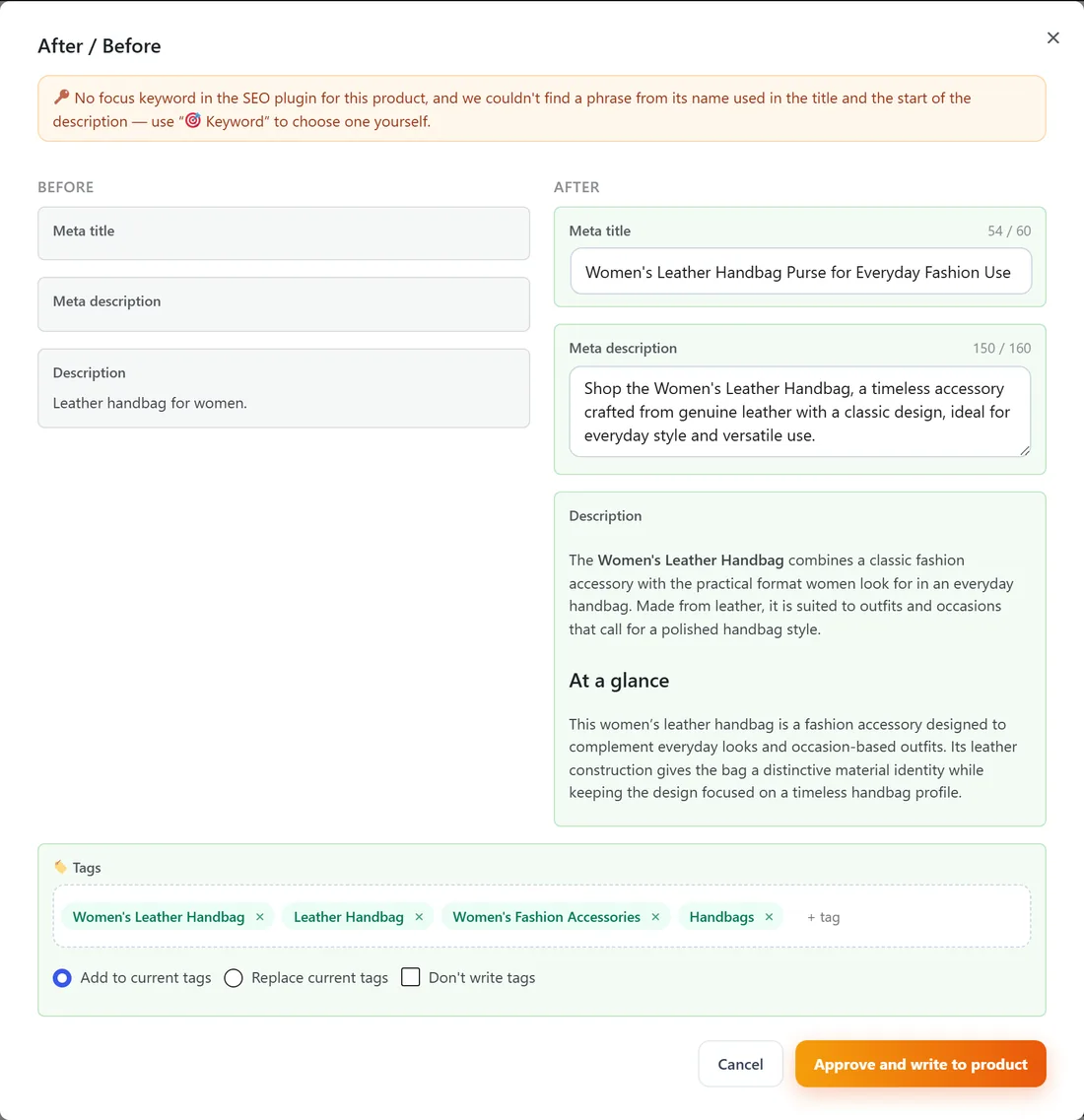
The before and after preview. Nothing is written to your store until you approve it, and the old content is backed up for one-click restore.
Here is what it adds that the classic plugins don’t:
- Bulk product optimization. Select products and RankX works through them one by one, with a preview you can check first. Every change is backed up and can be undone.
- Categories and brands. Descriptions, meta and FAQs for category and brand pages, which usually sit empty.
- Image ALT text for every product image that’s missing it.
- FAQs written into the visible description, with FAQPage schema read from that visible text (Google only trusts schema that matches what visitors see).
- Target keyword and AEO modes, so a product can be written around a keyword using live Google data, or written to be quoted by AI answers in Google AI Mode and ChatGPT.
- Blog writer for full articles that link back to your products.
- Auto mode, which improves new and incomplete products every day within a limit and time window you set. The first batch waits for your review.
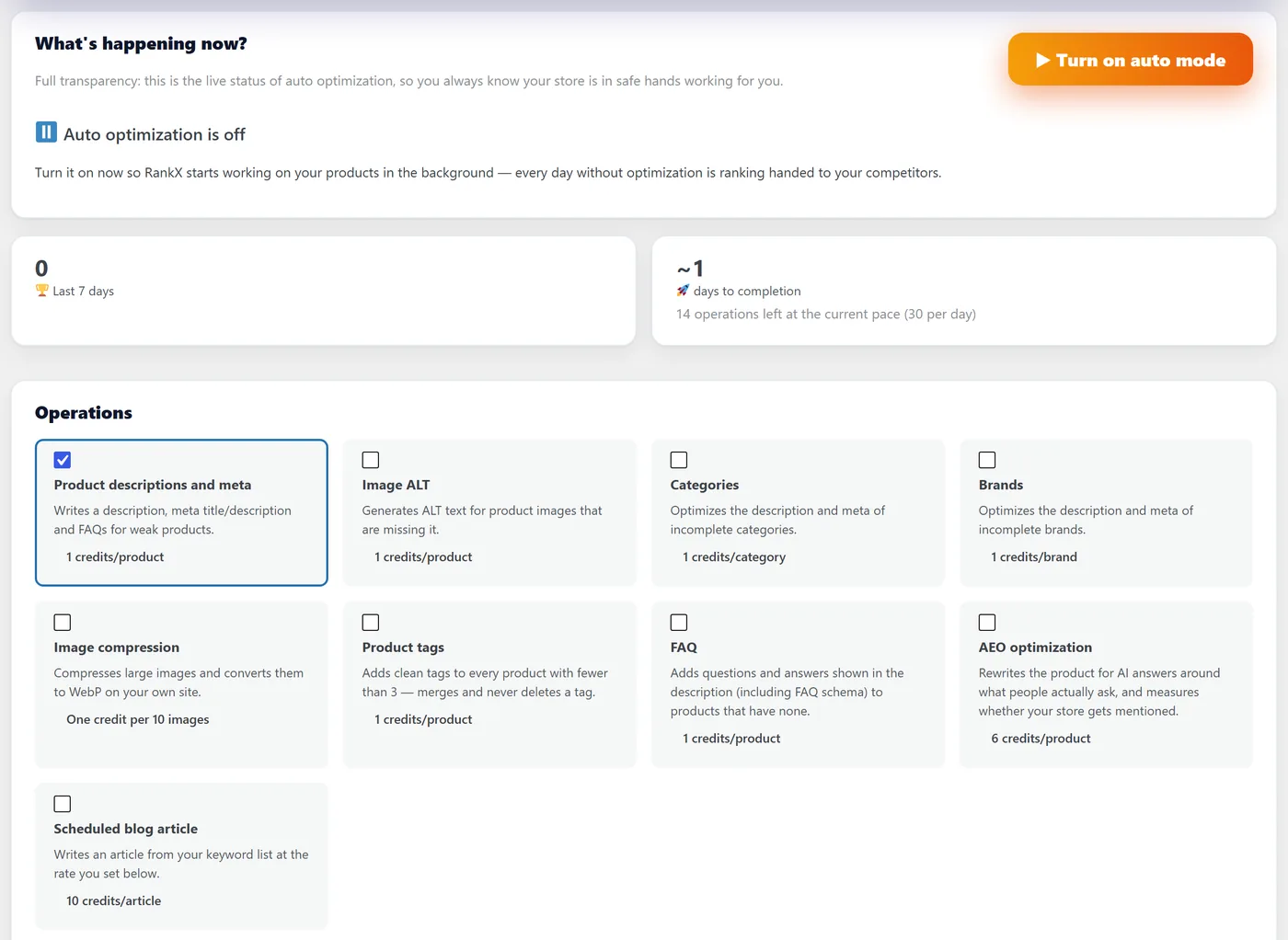
Auto mode: choose the operations once, set a daily limit, and new products stop arriving without descriptions or ALT text.
There’s also a set of free local features that run on your own hosting and never contact our servers: SEO status for every product, product and category schema, redirects (301, 302, 410) with 404 monitoring, broken-link checks, orphan products, llms.txt and AI-crawler rules, Open Graph and canonical tags, and an image compression preview with backups.
Pricing model: installing is free and connecting your store gives you 10 free optimizations. After that, AI work uses pay-as-you-go credits; there’s no monthly subscription to keep alive.
Honest limits: RankX requires WooCommerce. It writes into Yoast and Rank Math fields today, so if you run AIOSEO or SEOPress, check how you want meta handled before turning it on. And it isn’t trying to replace your sitemap or technical plugin; it’s the half of the job they leave empty.
Best for: stores with dozens or hundreds of products that need real, unique content, and Arabic or bilingual stores.
Side-by-side comparison table
This table compares the six plugins on the features that matter for a WooCommerce store. “Paid” means the feature exists but needs a premium licence or add-on; features and plans change, so confirm on each vendor’s site before you buy.
| Feature | Rank Math | Yoast SEO | AIOSEO | SEOPress | The SEO Framework | RankX SEO |
|---|---|---|---|---|---|---|
| Free version | Yes, generous | Yes | Yes | Yes, ad-free | Yes | Yes + 10 free AI optimizations |
| WooCommerce product schema | Free | Paid add-on | Yes | Pro | Basic | Free (steps aside if Yoast/Rank Math output it) |
| Redirects + 404 log | Free | Premium | Paid | Pro | Extension | Free |
| Meta title and description fields | Yes | Yes | Yes | Yes | Auto-generated | Writes into Yoast / Rank Math fields |
| AI-written meta in bulk | Content AI (credits) | One at a time (Premium) | AI helper | Pro, your own OpenAI key | No | Yes, with preview |
| AI-written product descriptions | Content AI, in editor | No | Limited | No | No | Yes, structured, in bulk |
| Image ALT text writing | Rules-based (e.g. from file name) | No | Rules-based (paid) | Limited | No | AI reads each image |
| Orphan products / internal links | Suggestions | Suggestions (Premium) | Link assistant (paid) | Basic | No | Orphans + one-click link insertion |
| Before/after Google impact per product | Positions only | No | Limited | No | No | Clicks, position and sales before vs after |
| Arabic interface and content | Partial translation | Translated | Translated | Translated | Translated | Native Arabic and English |
| Pricing model | Yearly plans | Yearly per site | Yearly | Yearly, many sites | Free + extensions | Pay as you go |
If you read that table and thought “so I need two of them”, you’ve understood the article.
Technical SEO plugin vs AI content plugin: why stores need both
A technical SEO plugin tells Google what your pages are; an AI content plugin makes those pages worth ranking. Yoast or Rank Math can give a product a perfect title tag, schema and canonical, and it will still lose to a competitor whose product page actually answers the shopper’s questions.
We see the same pattern on store after store. The SEO plugin is installed, the traffic lights are mostly green, and yet hundreds of products carry a one-line description copied from the supplier, no ALT text and an auto-generated meta description that repeats the product name. That isn’t a settings problem. It’s a writing problem multiplied by your catalog size.
The workable setup looks like this:
- Rank Math or Yoast handles sitemaps, schema, breadcrumbs, canonicals and the meta fields.
- RankX SEO fills those fields, rewrites thin descriptions, adds FAQs and ALT text, and links orphan products.
- Search Console (connected inside RankX) tells you which optimized products actually moved.
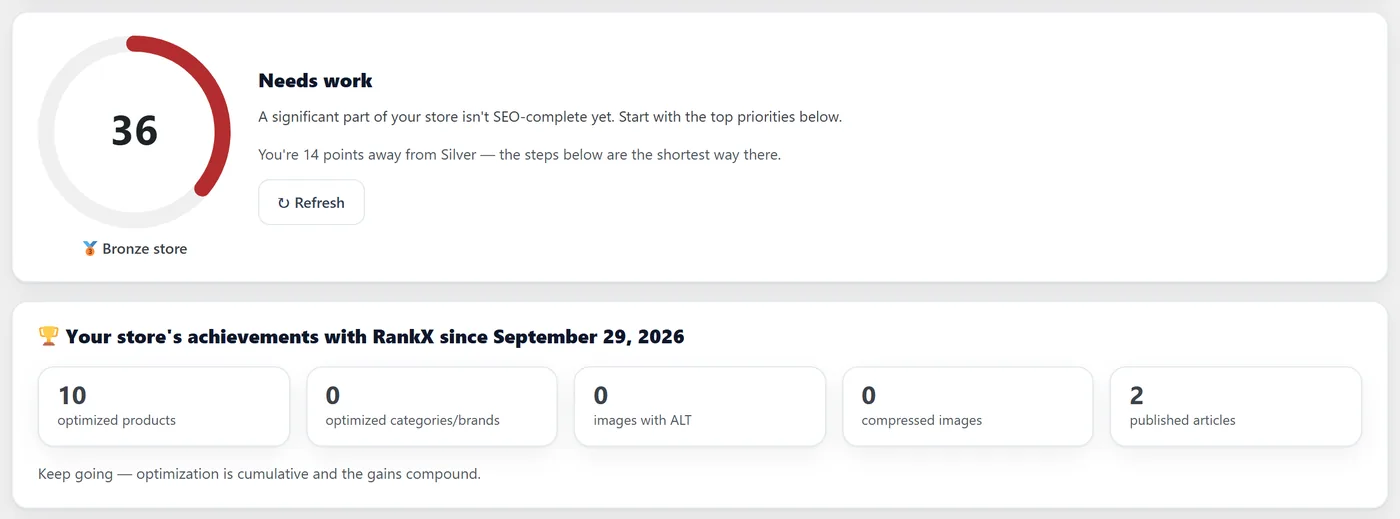
The store overview: one score for the catalog as it is, and what has been improved so far.
Internal links and orphan products
Orphan products are items no other page on your store links to, and Google treats them as unimportant even when they sell. Fixing them is one of the cheapest ranking wins in WooCommerce, and most SEO plugins only count links rather than add them.
RankX’s free Internal links screen lists products that sell but nothing links to, products sitting just outside page one, links pointing at unavailable products, and descriptions with no links at all. Each row suggests a source page and adds the link in one click. Links you add are then measured: Google position 28 days before against 14 days after.
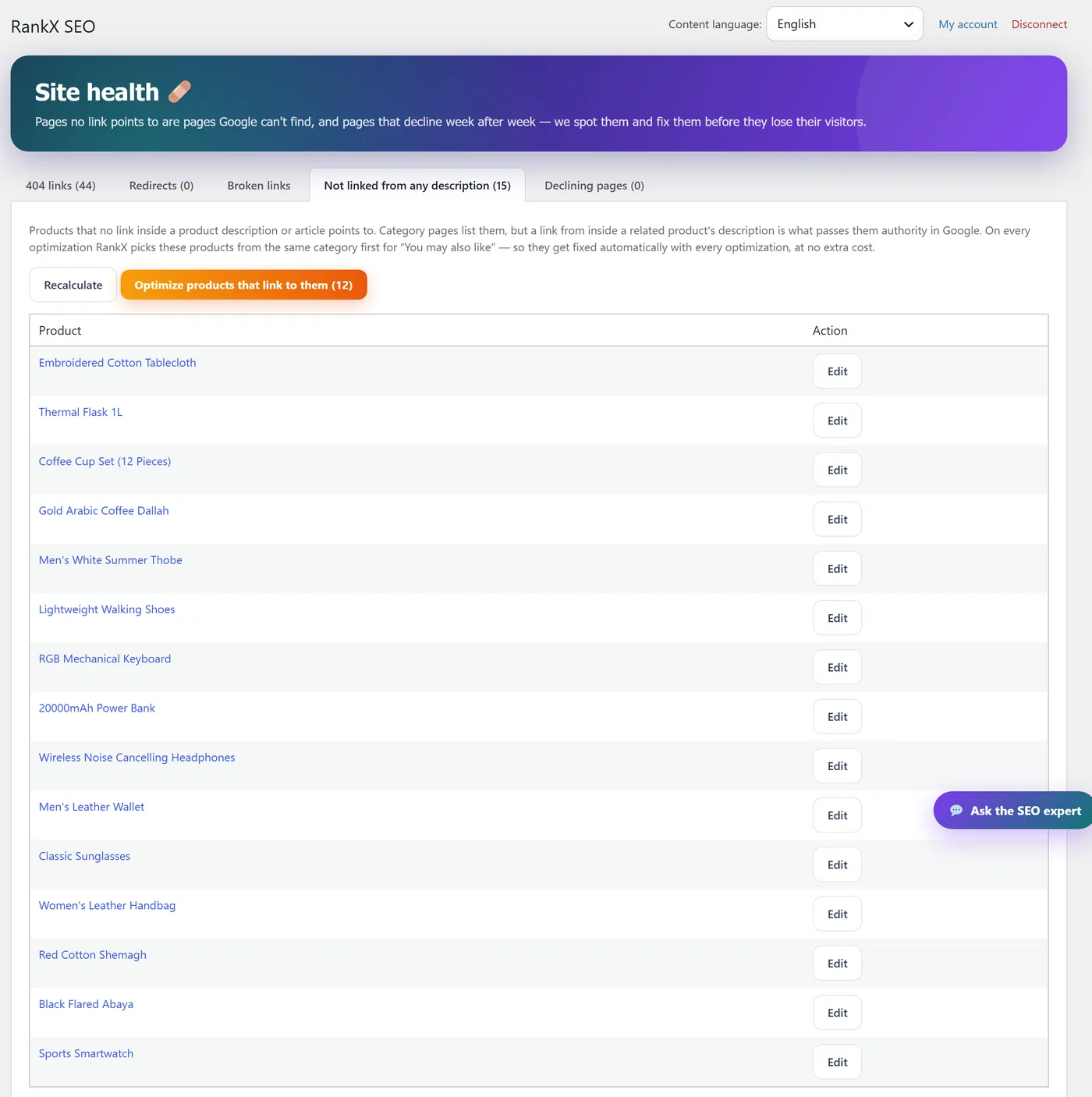
Orphan products with a suggested source and one-click "Add link".
How to measure whether your SEO plugin is working
The only fair test of an SEO plugin is a before-and-after on real Google data: impressions, clicks and average position for the pages you changed, compared against the period before the change. A green score inside WordPress is not a ranking.
Here’s a simple routine that works whatever plugin you choose:
- Note the date you optimized each product.
- In Search Console, compare the 28 days before that date with the 28 days after, filtered to that product URL.
- Give new pages at least two to four weeks. Updated pages that Google already knows are re-crawled faster than brand-new URLs, but nothing is guaranteed.
RankX does this per product automatically once you connect Search Console and Analytics, with a verdict and the next step for each product.
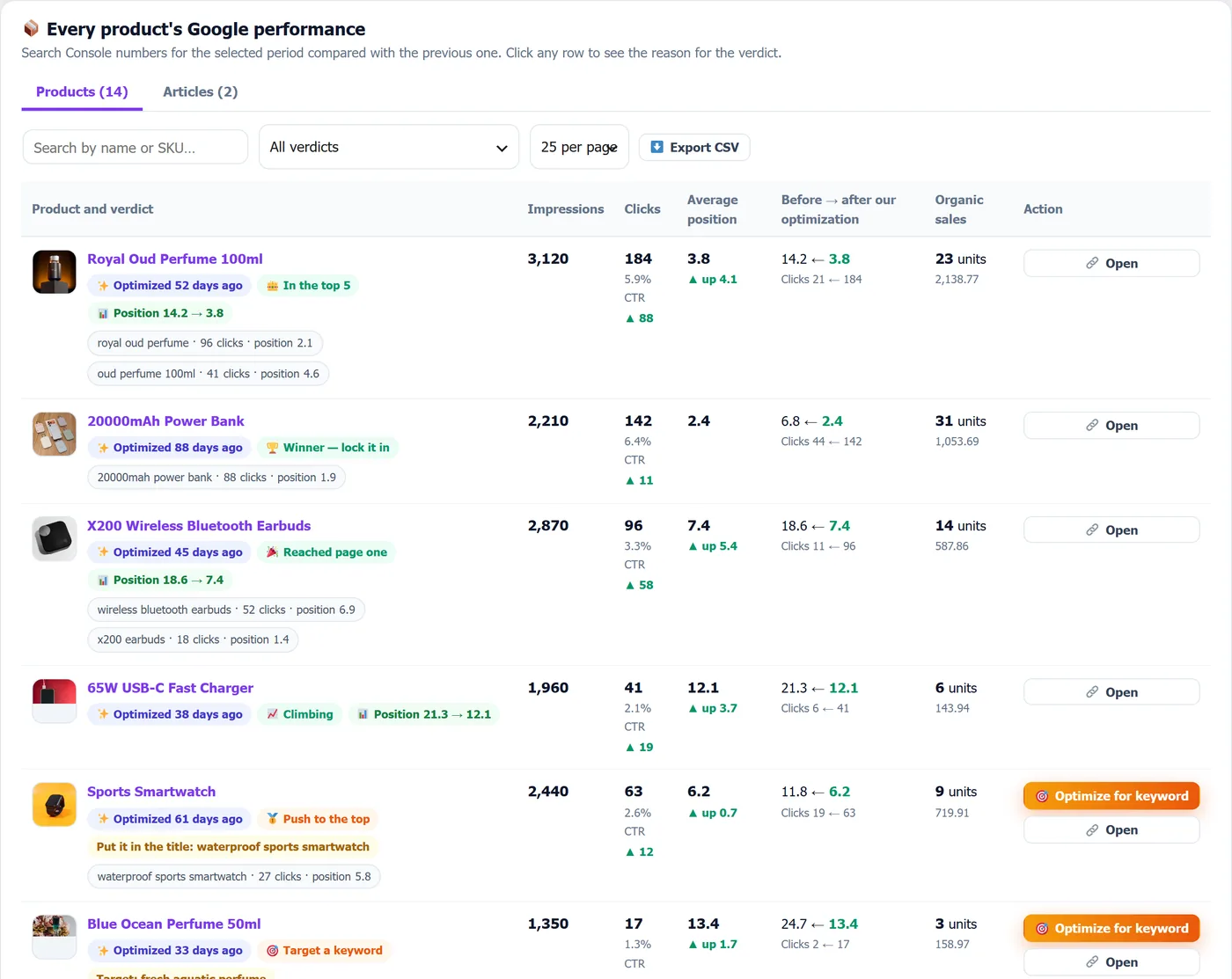
Product by product: where each item ranked before optimization and where it ranks now. The demo store isn't connected to Google, so this screen shows sample data.
Try RankX SEO on a live demo store (and download it)
You can test RankX SEO before installing anything. We run a live WooCommerce demo store with the plugin already set up; its credits refill every day and the store resets every night, so you can optimize products, generate meta and ALT text and watch the SEO score change without risk.
- Open the demo store in one click: wp-demo-en.rankxseo.com
- Or sign in manually at wp-demo-en.rankxseo.com/wp-admin with username
demo-enand passwordRankxDemo2026. - Download the plugin (free): rankxseo.com/wordpress/rankx-seo.zip — the link always serves the latest version.
- Full feature tour and screenshots: rankxseo.com/en/wordpress
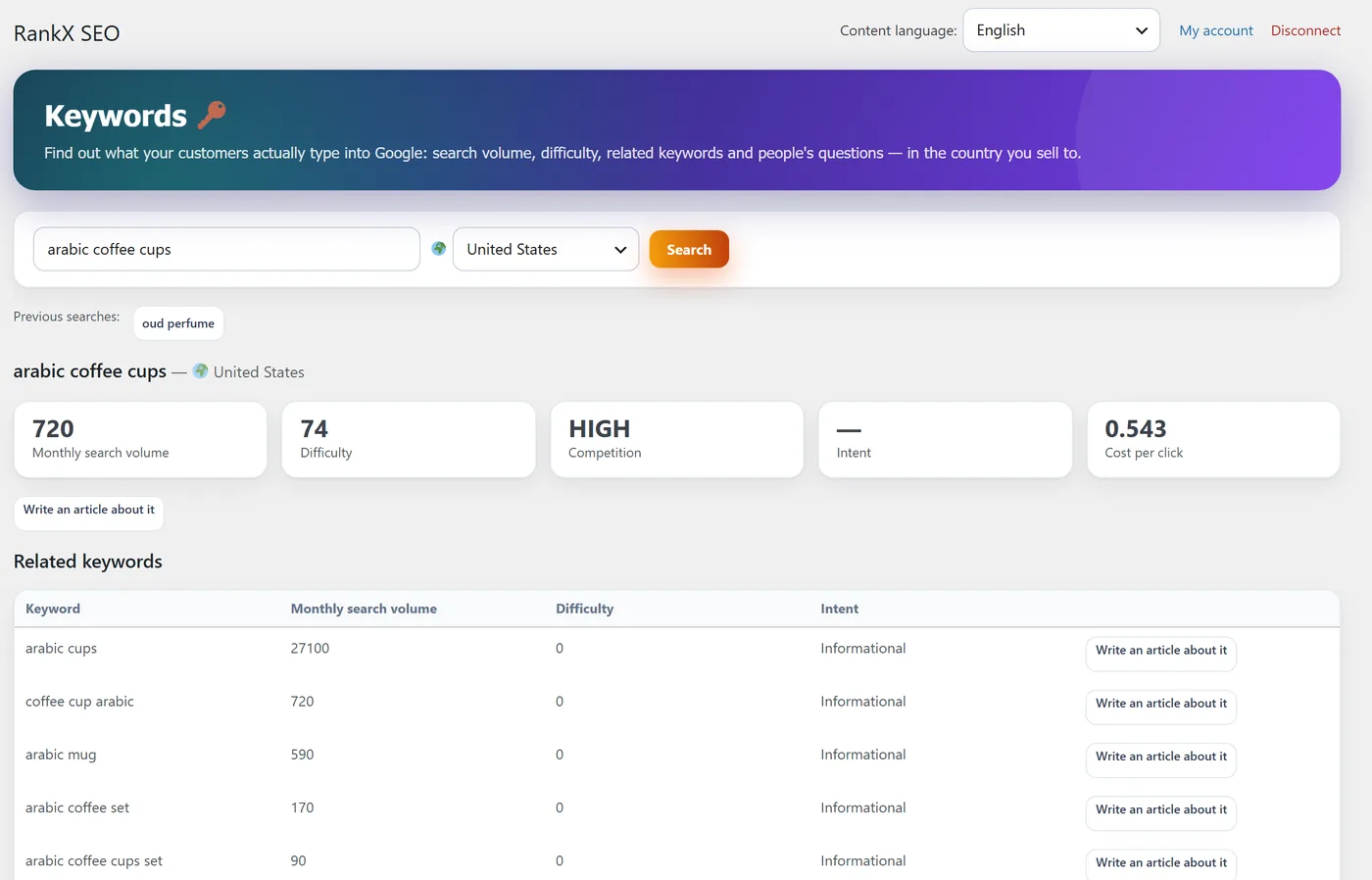
Keyword research inside the demo store. Click the image to open the demo.
How to install and set up a WooCommerce SEO stack in 10 minutes
Setting up the two-plugin stack takes about ten minutes and doesn’t need a developer. Install the technical plugin first, then the content plugin, and only then start optimizing products.
- Install Rank Math or Yoast from Plugins → Add New, run its setup wizard, and make sure product and category sitemaps are on and cart, checkout and account pages are noindex.
- Download RankX SEO from rankxseo.com/wordpress/rankx-seo.zip, then go to Plugins → Add New → Upload Plugin, choose the file, install and activate.
- Connect your store from the RankX SEO menu with your email. Nothing is sent to our service before this step, and you get 10 free optimizations.
- Start with your best sellers. Optimize five products, read the before and after, and approve the ones you like. Don’t bulk-run 500 products on day one.
- Connect Search Console and Analytics inside RankX so every change is measured.
- Turn on Auto mode only once you trust the output, with a daily limit you’re comfortable with.
Want a quick look at where your store stands first? Our free SEO checker and AEO checker scan any page in a few seconds, no account needed.
Common WooCommerce SEO mistakes plugins won’t fix for you
Plugins can’t fix decisions, only settings. These are the mistakes we see most on WooCommerce stores, even ones running a premium SEO plugin.
- Two SEO plugins outputting the same tags. Running Yoast and Rank Math together duplicates titles and schema. Pick one technical plugin; content tools like RankX are built to sit next to it, not compete with it.
- Supplier descriptions copied as is. If 40 stores carry the same paragraph, Google has no reason to pick yours.
- Deleting out-of-stock products without a redirect. That throws away whatever rankings and links the page had. Redirect to the closest product or category instead.
- Meta descriptions that just repeat the title. Auto-generated meta is better than nothing, but it rarely earns the click.
- Ignoring category pages. Categories often rank for broader, higher-volume searches than individual products, yet most stores leave their descriptions empty.
- Heavy, unoptimized images. Slow product pages hurt both rankings and sales. Converting product photos to WebP is one of the easiest speed wins.
Frequently Asked Questions
What is the best SEO plugin for WooCommerce?
For most stores, Rank Math is the best single free plugin because it includes WooCommerce product schema, redirects and Search Console data at no cost. Stores with many products get the best results by pairing Rank Math or Yoast with an AI content plugin like RankX SEO that writes the descriptions, meta tags and ALT text.
Is Rank Math better than Yoast for WooCommerce?
For WooCommerce, Rank Math gives you more for free, including product schema that Yoast keeps in a paid WooCommerce add-on. Yoast is easier for beginners and very stable. Both are solid technical foundations, and neither writes your product content for you.
Can I use two SEO plugins at the same time?
Don’t run two technical SEO plugins such as Yoast and Rank Math together, because they output duplicate titles, meta tags and schema. You can pair one technical plugin with a content plugin like RankX SEO, which writes into Yoast or Rank Math fields and steps aside where they already output schema.
Is there a free WooCommerce SEO plugin?
Yes. Rank Math, Yoast SEO, AIOSEO, SEOPress and The SEO Framework all have free versions, and Rank Math’s is the most complete for stores. RankX SEO is free to install, includes free local features such as redirects, schema and orphan product detection, and gives 10 free AI optimizations when you connect.
Do I need the Yoast WooCommerce SEO add-on?
You need it only if you stay on Yoast and want its richer product schema, product-specific checks and WooCommerce breadcrumbs. If you’d rather not pay for the add-on, Rank Math covers most of the same WooCommerce features in its free version.
Can AI write my WooCommerce product descriptions?
Yes. AI plugins such as RankX SEO read your product name, attributes, categories and images and write structured descriptions, meta tags, FAQs and ALT text. The safe way is to review a before-and-after preview before anything is saved, and to keep a backup of the original text.
Does RankX SEO replace Yoast or Rank Math?
No. RankX SEO is built to work alongside them. Yoast or Rank Math handles sitemaps and technical settings, and RankX writes the content into their meta fields. It can also run on its own and output the meta tags itself if neither plugin is installed.
Does RankX SEO work for Arabic WooCommerce stores?
Yes. It was built first for stores in Saudi Arabia and the Gulf. The admin interface follows each user’s WordPress language, Arabic or English, and the generated content follows your site language, or you can pin it to Arabic or English.
How long does it take to see SEO results on WooCommerce?
Updated product pages that Google already indexes are usually re-crawled within days, but ranking changes typically take two to eight weeks, and nothing is guaranteed. Measure each optimized product in Search Console against the period before you changed it.
So, which one should you install?
If you just want one free plugin, install Rank Math and configure it properly. If your store has more than a handful of products, though, the real gap is content, not settings: pair Rank Math or Yoast with RankX SEO, start with your best sellers, and let Search Console tell you what worked.
Try it first on the live demo store, then download the plugin when you’re ready. It takes two minutes to install, and your first 10 optimizations are on us.